CrossFire PRO vs XR: Which Plasma Table Is Worth the Price Jump?

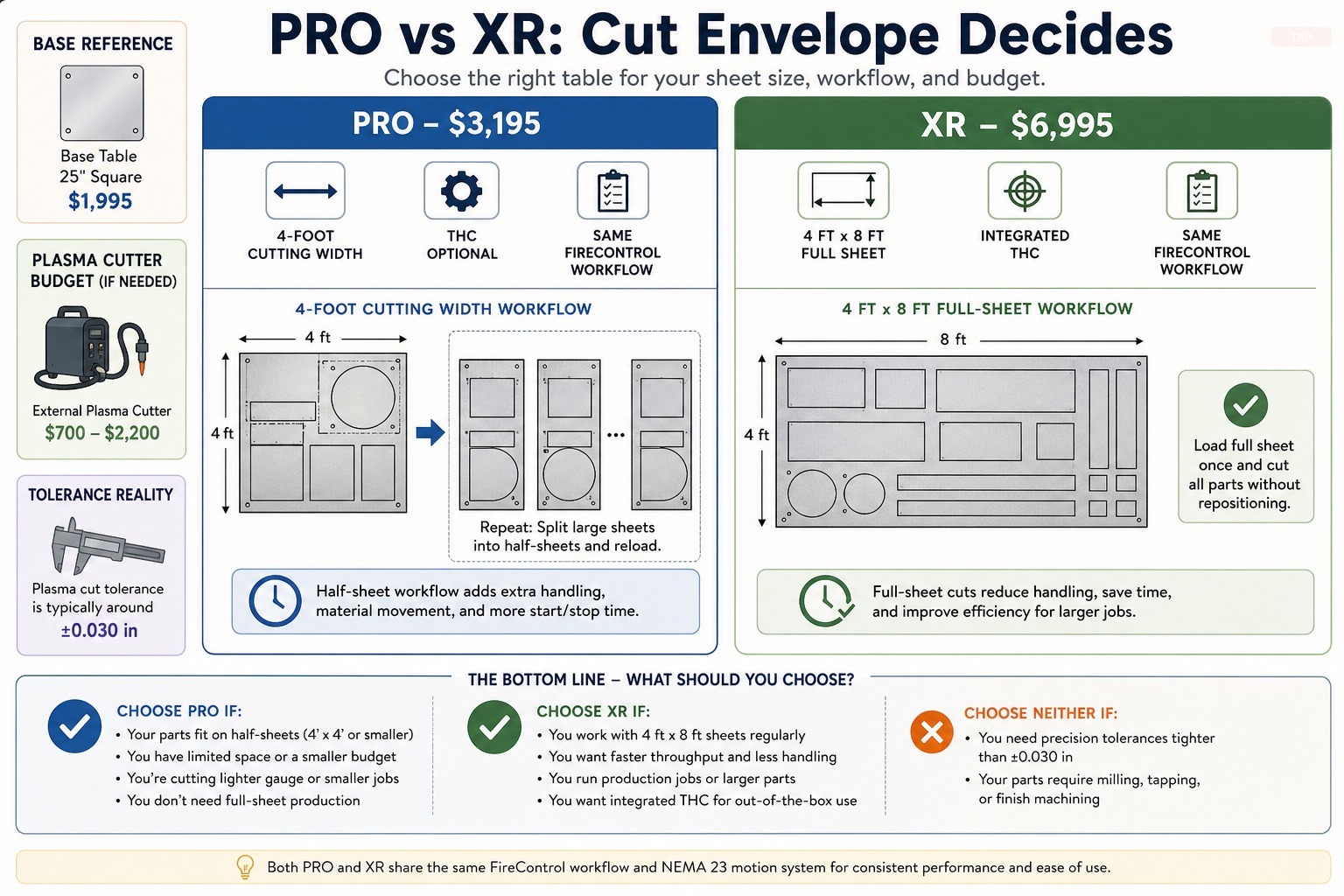
Which Table Should You Buy?
| CrossFire PRO | CrossFire XR | |
|---|---|---|
| Price | $3,195 | $6,995 |
| Cut envelope | 4-foot wide | Full 4′ × 8′ sheet |
| Full sheet (4’×8’) direct? | No — must pre-cut | Yes — load and run |
| THC (torch height control) | Add-on ($) | Integrated standard |
| Drive system | Lead screw / rack hybrid | Rack and pinion (long axis) |
| Frame | Welded steel tube | Heavy-duty industrial |
| Right buyer | Garage fab, sign shop, small-batch parts | Production shop, full-sheet nesting, high volume |
Buy the PRO if your parts fit within a 4-foot cutting width and full-sheet processing is rare or nonexistent.
Buy the XR if you regularly load 4’×8’ raw stock and need to skip pre-cutting entirely.
Buy neither if your parts fit within 25” square — the base CrossFire ($1,995) is the right call at that scope.
If you’re choosing between the Langmuir CrossFire PRO and CrossFire XR, the decision isn’t really about features — it’s about cut envelope. Both tables share Langmuir’s FireControl software stack, both use NEMA 23 stepper motors, and both are designed around the same general assembly philosophy. What separates them is how large a piece of sheet metal you need to process in a single setup, and the price gap reflects that capacity difference, not a sea change in technology.
Get that question wrong and no amount of feature comparison will save you. Buy the PRO when you need 4’x8’ capacity, and you’ll be spending the next two years breaking full sheets down with an angle grinder before you can run a program. Buy the XR when your parts are mostly 24” square, and you’ve spent more than triple what the base CrossFire would have cost for capacity you’ll never use.
This comparison is built around manufacturer specifications and publicly available technical documentation. Neither table has been tested in-house. The recommendations below are structured around buyer use case, not price point.
CrossFire PRO: What It Is and Who It’s For
The CrossFire PRO is Langmuir’s middle-tier table. According to Langmuir Systems product documentation, the PRO is built around a 4-foot cutting width and is positioned for “the small business bringing small run parts in house or the garage warrior stepping up.” It uses NEMA 23 stepper motors, runs FireControl software, and ships with a water tray and Z-axis. Per Langmuir’s product page, THC (Torch Height Control) is offered as an upgrade rather than bundled standard, so factor that into the budget if cut quality on warped material matters.
Pricing starts at $3,195 per current Langmuir list pricing.
Where the PRO earns its keep:
For shops processing parts up to 4 feet wide — sign blanks, bracketry, mounting plates, decorative panels, trailer parts, fabrication components — the PRO hits the pricing-vs-capability sweet spot in the Langmuir lineup. The 4-foot width accepts a half-sheet of stock without modification. Garage fabricators who have outgrown the 25”-square base CrossFire but don’t need full 4’x8’ processing are the natural buyers.
The PRO is also the right call for sign shops, ag-equipment fabricators, and small custom-metal businesses that run small batches of repeated parts. The repeatability of FireControl plus a 4-foot cut envelope covers the majority of part geometries these shops produce.
Who the PRO is NOT for:
If full 4’x8’ sheet processing is part of the regular workflow, the PRO will create an upstream labor tax. Every full sheet has to come down to 4-foot width before it hits the table — that’s a band-saw or shear operation per sheet, and it compounds fast in production. Buyers who plan to nest parts efficiently across full sheets should step up to the XR rather than fight the PRO’s geometry.
The PRO is also not a fit for hobbyists whose parts already fit within the base CrossFire’s 25”-square envelope. The PRO’s larger footprint is overhead without benefit at that scope, and the price gap to the base CrossFire ($1,200) buys floor space and accessories instead.
CrossFire XR: What It Is and Who It’s For
The CrossFire XR is Langmuir’s production-oriented flagship. According to Langmuir Systems’ product positioning, the XR is “a high performance industrial CNC Plasma table with 4x8’ cutting envelope, heavy-duty industrial frame and loaded with features that increase efficiency and cut quality.” Per Langmuir’s documentation, the XR uses a rack-and-pinion drive system on the long X-axis — common on industrial gantry plasma tables — and includes integrated THC as standard rather than as an add-on.
Pricing is $6,995 per current Langmuir list pricing. The XR has effectively replaced the older CrossFire PRO 4’x8’ configuration as the top of the Langmuir lineup.
Where the XR earns its keep:
The XR is the minimum viable Langmuir configuration for shops that process full sheet steel. At 4’x8’, raw stock goes directly on the table — no upstream cutting, no sheet handling beyond loading, no pre-program prep. For a fabrication shop running structural components (gussets, mounting flanges, enclosure panels, support brackets, trailer parts) or a sign shop running aluminum and steel signage, the XR’s full-sheet capacity converts directly into throughput.
The integrated THC is also meaningful at this tier. THC continuously adjusts torch standoff distance based on arc voltage feedback, which compensates for material warpage and surface variation during a cut — a real factor on long cuts across full sheets. Many comparable 4’x8’ tables in this price range either omit THC or charge for it as an add-on.
At $6,995, the XR also undercuts comparable 4’x8’ production tables — Arclight FullSheet, Lincoln Torchmate 4800 — by 40 to 60 percent per their published list pricing. For shops that previously priced industrial-grade plasma tables at $12,000–$18,000, the XR has materially shifted the entry point.
Who the XR is NOT for:
If your parts consistently fit within a 4-foot cutting width, the XR’s larger footprint and rack-and-pinion drive are overhead without benefit. The PRO at less than half the price covers that workload. The XR is also not the right answer for buyers who need dimensional tolerances tighter than ±0.030” — plasma cutting’s inherent kerf variation and dross formation typically dominate over table accuracy at that level. Those buyers should be looking at CNC mills, lasers, or waterjets.
The XR is also a poor fit for shops with limited floor space. The 4’x8’ footprint demands meaningful clearance for sheet loading and cut-edge fume management, which a small one-bay shop may not have without rearranging the rest of the equipment.
Software Stack: FireControl, Fusion, and SheetCAM
The software workflow is identical across both tables, so it should not factor into the PRO-vs-XR decision — but it is worth understanding before either purchase, because the table is only half the system.
Per Langmuir’s documentation, both tables run FireControl, Langmuir’s free machine-control software. FireControl does not generate toolpaths itself — it is the controller that streams G-code to the table, manages the cut sequence, and (where equipped) drives Torch Height Control from arc-voltage feedback. The CAM step that produces that G-code happens upstream in a separate program.
| Software layer | Role | PRO | XR | Notes |
|---|---|---|---|---|
| CAD (part design) | Draw the part or import DXF/DWG | Same | Same | Fusion, SolidWorks, Inkscape, or any DXF source |
| CAM (toolpath + nesting) | Generate plasma G-code | Same | Same | Fusion 360 plasma post or SheetCAM |
| FireControl (control) | Stream G-code, run THC, manage cut | Included, free | Included, free | THC driven only when THC hardware is present |
| THC integration | Live torch-height correction | Add-on hardware required | Integrated standard | Same FireControl logic; differs only in hardware |
Per Langmuir’s documentation, the two common CAM paths are:
- Fusion 360 — Autodesk’s CAD/CAM package, which Langmuir publishes a plasma post-processor for. Fusion handles design and toolpath in one environment and is a frequent choice for shops already modeling parts in 3D. Autodesk offers a limited free tier for personal use; commercial use requires a paid license, which is a recurring cost to budget separately.
- SheetCAM — a low-cost, plasma-focused CAM program (one-time license per SheetCAM’s published pricing) widely used in the Langmuir community for 2D nesting. For shops that mostly import flat DXF parts and nest them on a sheet, SheetCAM is often the faster, cheaper path than full Fusion.
The practical takeaway: the XR’s larger sheet makes nesting efficiency matter more, so XR buyers tend to lean on SheetCAM or Fusion nesting to fill a full 4’×8’ sheet. But the software cost and learning curve are the same on both tables. Budget for a CAM license and the time to learn it regardless of which table you choose.
Shared Platform: What Both Tables Get Right
Both tables run Langmuir’s FireControl software, which handles machine control and THC management from a single interface. Per Langmuir’s documentation, FireControl is designed to run standard G-code produced by common CAD/CAM tools.
Both tables are compatible with most 240V plasma cutters. Langmuir’s documented compatibility list includes Hypertherm, Miller, Lincoln, and Razorweld units, among others. Neither table ships with a plasma cutter — that’s a separate purchase.
For most buyers, a mid-range plasma cutter with machine torch compatibility is the correct pairing. The Hypertherm Powermax45 XP is a well-documented choice in this segment — per Hypertherm’s product data, it delivers 45 amps of cutting power, rated to cut 5/8” mild steel and sever up to 7/8”. It’s compatible with both Langmuir tables via the appropriate torch lead configuration.
Check the Hypertherm Powermax45 XP on Amazon →
THC integration differs between the two tables. Per Langmuir’s documentation, THC is integrated as standard on the XR but is offered as an add-on for the PRO. THC continuously adjusts torch standoff distance based on arc voltage feedback during a cut, compensating for material warpage and surface variation. Buyers ordering a PRO should plan to add THC at purchase rather than fight without it.
Direct Comparison: Specs Side by Side
| Spec | CrossFire PRO | CrossFire XR |
|---|---|---|
| Cut envelope | 4-foot cutting width | 4’ x 8’ (full sheet) |
| Full 4’×8’ sheet direct | No — requires upstream cut | Yes — no pre-cutting needed |
| Shop floor requirement | Compact (sub-4’×8’) | 4’×8’ + sheet loading clearance |
| Frame | Welded steel tube | Heavy-duty industrial frame |
| Drive system (long axis) | Lead screw / rack hybrid | Rack and pinion |
| Motors | NEMA 23 stepper | NEMA 23 stepper |
| Software | FireControl | FireControl |
| THC | Optional add-on | Integrated standard |
| Water table | Water tray included | Heavy-duty water table included |
| Pierce height (THC) | Per Langmuir THC documentation: set to 1.5× cut height default | Per Langmuir XR documentation: integrated THC uses same 1.5× cut height reference |
| Cutting speed rating | Per Langmuir documentation: FireControl supports speeds up to 400 ipm (material and plasma source dependent) | Per Langmuir documentation: FireControl supports speeds up to 400 ipm (material and plasma source dependent) |
| Warranty | Per Langmuir’s warranty documentation: 1-year limited warranty on mechanical and electrical components | Per Langmuir’s warranty documentation: 1-year limited warranty on mechanical and electrical components |
| Lead time / shipping | Per Langmuir’s documentation: typically ships within several weeks in kit form; check langmuirsystems.com for current lead times | Per Langmuir’s documentation: typically ships within several weeks in kit form; check langmuirsystems.com for current lead times |
| Price (per Langmuir, 2026) | $3,195 starting | $6,995 starting |
Total Cost of Ownership
The list price gap between the PRO and XR is $3,800 — but neither table ships with a plasma cutter, and the PRO doesn’t include THC. Here’s what both setups actually cost to run from day one.
| Cost Component | CrossFire PRO (all-in) | CrossFire XR (all-in) |
|---|---|---|
| Table (list price) | $3,195 | $6,995 |
| THC add-on | ~$500 (per Langmuir pricing; not included in base price) | Integrated — $0 additional |
| Plasma cutter — budget | PrimeWeld CUT60: ~$699–$799 | PrimeWeld CUT60: ~$699–$799 |
| Plasma cutter — mid-range | Hypertherm Powermax45 XP: ~$1,800–$2,200 | Hypertherm Powermax45 XP: ~$1,800–$2,200 |
| Consumables starter kit | ~$100–$200 (electrodes, shield caps, nozzles) | ~$100–$200 |
| Total (budget plasma) | ~$4,495–$4,695 | ~$7,795–$7,995 |
| Total (mid-range plasma) | ~$5,495–$5,895 | ~$8,895–$9,395 |
Key takeaway: Once THC and a plasma source are factored in, the real-world gap between a PRO setup and an XR setup narrows to approximately $3,300–$3,500. The XR includes THC in its base price, which partially closes the sticker gap. Buyers treating the $3,800 table price differential as the full budget difference are understating the PRO’s actual all-in cost.
Frequently Asked Questions
Can the CrossFire PRO cut a full 4’×8’ sheet?
No. The PRO’s cut envelope is 4 feet wide but does not accommodate full 4’×8’ sheet length in a single setup. To run a full sheet on the PRO, the material must be pre-cut to 4-foot width upstream — using a band saw, shear, or angle grinder — before it goes on the table. Shops that process full sheets regularly will pay that labor cost on every single sheet. Buyers whose workflow depends on full-sheet nesting should step up to the XR.
Is THC worth adding to the CrossFire PRO?
Yes, for most buyers. Torch Height Control continuously adjusts the torch standoff distance based on arc voltage feedback during a cut. Without THC, surface variation and material warpage — common on sheet steel that’s been warehoused, transported, or thermally cycled — will cause the torch to diverge from optimal cut height mid-program, producing inconsistent cuts, excess dross, and occasional divots. Per Langmuir’s THC documentation, the add-on integrates directly with FireControl. At ~$500, THC is one of the higher-return upgrades available for the PRO. Order it at purchase rather than retrofitting later.
What plasma cutter works best with these tables?
Per Langmuir’s compatibility documentation, both tables support most 240V plasma cutters with machine torch capability. Two options dominate the Langmuir community:
- Budget pick — PrimeWeld CUT60 (~$699–$799): 60-amp output, compatible with CNC torch leads, and widely used with Langmuir tables. Good fit for the PRO buyer running mild steel up to 1/2”.
- Mid-range pick — Hypertherm Powermax45 XP (~$1,800–$2,200): 45 amps, rated for 5/8” mild steel clean cut and 7/8” severance per Hypertherm’s product data sheet. Better consumable life and consistency than most alternatives at this price. The correct choice for XR buyers running production volume or stainless.
Check the Hypertherm Powermax45 XP on Amazon →
What is the CrossFire XR lead time?
Per Langmuir’s documentation, the XR typically ships within several weeks in kit form. Lead times vary based on inventory and demand cycles. Check langmuirsystems.com directly for current lead time estimates before planning a shop buildout schedule around a delivery date.
The Buying Decision
Choose the CrossFire PRO if:
- Your parts fit within a 4-foot cutting width
- You’re a garage fabricator, sign maker, or ag-equipment shop running mid-volume work
- Full 4’x8’ sheet processing is rare or doesn’t happen at all
- Budget ceiling is around $3,500–$4,000 with THC and accessories
Choose the CrossFire XR if:
- You regularly process 4’x8’ sheet stock and want to skip pre-cutting
- You run a fabrication shop with production volume
- You’re cutting sign blanks, structural steel, or large panels at scale
- Integrated THC and the heavy-duty industrial frame are worth the price gap
Consider neither if:
- Your parts already fit within the base CrossFire’s 25”-square envelope — the $1,995 base CrossFire is the smarter spend at that scope. See Best CNC Plasma Tables for the full lineup including the base model.
- You need dimensional tolerances tighter than ±0.030” on long cuts — plasma cutting’s inherent kerf variation and dross formation typically dominate over table accuracy at that level. A CNC mill, laser cutter, or waterjet is the appropriate tool for precision work at that tolerance.
- You’re processing material heavier than the plasma source can cut cleanly — neither table changes the capacity of the plasma cutter it’s paired with.
What to Buy With Either Table
Both tables require an external 240V plasma cutter. Budget $700–$2,200 for a quality unit depending on cutting capacity needed — the PrimeWeld CUT60 ($699–$799 per current PrimeWeld pricing) is a common budget pairing, while the Hypertherm Powermax45 XP ($1,800–$2,200) is the most commonly specified mid-range source for CNC tables. For a broader look at machine-torch-capable sources across the budget range, see best plasma cutters under $1000.
Both tables also depend on a clean, continuous compressed-air supply, and production cutting on the XR in particular can outrun a small piston compressor mid-sheet. Shops running full-sheet volume should size the air system to the plasma source’s CFM with margin — a rotary screw compressor delivers the sustained output that continuous plasma cutting demands.
For more context on how these tables compare to other CNC plasma options in this price range, including Arclight Dynamics, Lincoln Torchmate, and Baileigh PT-22, see the full guide: Best CNC Plasma Tables →
Sources
- Langmuir Systems CrossFire XR product specifications and documentation, langmuirsystems.com
- Langmuir Systems CrossFire PRO product specifications and documentation, langmuirsystems.com
- Langmuir Systems FireControl software documentation
- Hypertherm Powermax45 XP product data sheet, hypertherm.com